Free laser cut SVG and DXF files let you test your laser on wood, acrylic or leather before buying anything. The best designs for laser engraving and cutting are bold silhouettes and clean line art with no tiny gaps. Below are free designs from the WOW SVG shop that include both SVG and DXF files, plus tips for setting them up in LightBurn, xTool Creative Space and Glowforge.
Key takeaways
- Use the SVG or DXF file for laser cutting and scoring, and the PNG for photo-style engraving.
- Solid silhouettes are best for engraving (fill), single-line drawings are best for scoring (line).
- Every design below is free and includes SVG, PNG, EPS and DXF files.
- Commercial use of finished products is included, so you can sell your signs, coasters and ornaments.
Free Laser Engraving Files: Solid Silhouettes
Solid designs engrave as a fill, which looks great on wood coasters, cutting boards and leather patches.

Free Majestic Lion Head SVG
a detailed lion head in profile with a flowing mane.

Free Highland Cow Head SVG
a solid Highland cow head with thick fringe and upturned horns, a farmhouse favorite.

Free Jumping Bunny SVG
a solid bunny silhouette mid-hop, perfect for Easter tags and cut-outs.

Free Bison Head SVG
a front-facing bison head outline for mascot signs.
Free Line Art Files for Laser Scoring
Thin line designs work as a “line” or “score” operation, which is fast and looks elegant on acrylic and light wood.

Free Cow Head Outline SVG
a thin single-line drawing of a cow head with long horns.

Free Horse SVG
a standing horse drawn in clean black line art.

Free Leafy Wreath SVG
a round wreath of simple leaves, ready to frame a name or monogram.
Free Laser Cut Files for Ornaments and Signs
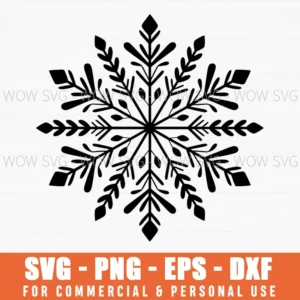
Free Snowflake SVG
a detailed six-point snowflake that cuts cleanly from 3 mm wood or acrylic.

Free Mountains Are Calling Camping Crew SVG
an RV, mountains and pines under “Mountains are calling, camping crew,” for a camper sign.
How to Use SVG and DXF Files With a Laser
- Unzip the download and import the SVG (or DXF) into LightBurn, xTool Creative Space or the Glowforge app.
- Check the scale. DXF files sometimes import at a different size. Set the width you want in inches or millimeters.
- Assign operations: set outer outlines to Cut, inner details to Engrave (fill) or Score (line).
- Test first on a scrap of the same material to dial in power and speed.
- Mask the wood with painter’s tape or transfer tape to prevent smoke stains.
SVG or DXF for Laser?
Both work. SVG keeps colors, which makes it easy to assign different operations to each layer in LightBurn. DXF is the classic CAD format that older laser and CNC software prefer. If one file imports oddly, try the other. Read more in our guide to SVG, PNG, DXF and EPS files.
More Free Files
Browse the full free SVG category or our guide on where to find free SVG files. Most premium designs at $2.50 also include a DXF file.
Frequently Asked Questions
Can I sell laser engraved products made with these free files?
Yes. Commercial use of finished products is included with every design, free ones too. You can’t resell or share the digital files themselves.
Do these files work with Glowforge?
Yes. Upload the SVG to the Glowforge app. It reads the vector paths and lets you set cut, score or engrave for each one.
Why does my DXF open at the wrong size?
DXF files don’t always store units. Check whether your software imported in millimeters or inches, then resize to the width you want.