To make a shirt with a Cricut, you need an SVG shirt design, heat transfer vinyl (HTV), a blank shirt and a heat press or iron. Upload the SVG to Cricut Design Space, size it, mirror it, cut it, weed the extra vinyl and press it onto the shirt. This guide walks through each step, with sizes, the right settings to look up and real SVG shirt designs from the WOW SVG shop to practice with.
Key takeaways
- Always mirror designs cut from heat transfer vinyl, or the text will be backwards.
- Adult shirt fronts fit a design about 10 to 11 inches wide, youth shirts 8 to 9 inches, toddlers 5 to 6 inches.
- Start with a one-color text design: it is the easiest to cut, weed and press.
- Use the PNG file for DTF transfers and sublimation when a design has many colors.
- Commercial use of finished products is included with every design, so you can sell the shirts you make.
What You Need
- A Cricut cutting machine (Joy, Explore or Maker) and a standard grip mat
- Heat transfer vinyl (iron-on)
- A cotton, polyester or blend shirt, washed without fabric softener
- A heat press, Cricut EasyPress or a household iron
- A weeding tool and an SVG shirt design
How to Make a Shirt With Cricut, Step by Step
- Upload: in Design Space, click Upload, then Upload Image, choose the .svg file and add it to the canvas.
- Size: measure your shirt and resize the design (about 10 to 11 inches wide for an adult front).
- Mirror: click Make It and turn on Mirror for every mat.
- Cut: place the vinyl shiny side down on the mat and choose your vinyl type in the material settings.
- Weed: peel away the vinyl you don’t need, leaving the design on the clear carrier sheet.
- Press: pre-press the shirt for a few seconds, place the design about 3 inches below the collar and press with the time and temperature from your vinyl maker or the Cricut Heat Guide.
- Peel: peel the carrier warm or cool, as your vinyl says. Wait 24 hours before the first wash.
Easy One-Color SVG Shirt Designs for Beginners
Text designs with thick letters are the best first project. These cut and weed in minutes:
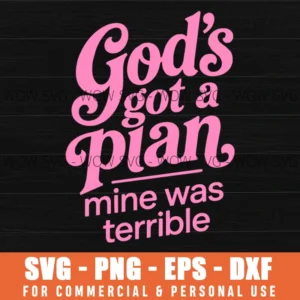
God’s Got A Plan Mine Was Terrible SVG
pink script “God’s got a plan, mine was terrible.”

I Can Make A Difference In The World SVG
“I can make a difference in the world” with florals, a good fit for teachers and volunteers.
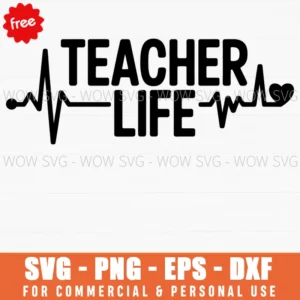
Free Teacher Life SVG
“Teacher Life” lettering with a heartbeat line. A free download for a test shirt.
Two- and Multi-Color Shirt Designs
Once you are comfortable, try layered designs. Cut each color separately and press the layers one at a time.

Currently Unbothered SVG
a smiley in sunglasses with “Currently unbothered.”

Summer State Of Mind SVG
palm trees on a retro sunset with “Summer state of mind.”

Squeeze The Day SVG
smiling lemons with “Squeeze the day.”
Common Mistakes to Avoid
- Forgetting to mirror: the design comes out backwards. Check the mat preview before cutting.
- Vinyl lifting after washing: press longer or with firmer pressure, and wash inside out in cold water.
- Tiny details: lines thinner than about 1/16 inch are hard to weed. Make the design bigger or choose a bolder one.
- Crooked placement: fold the shirt in half and press lightly to mark the center line before placing the design.
Where to Find SVG Shirt Designs
Browse our SVG designs for shirts, the funny quotes collection or the free SVG category. Not sure which file to use? Read SVG, PNG, DXF and EPS explained.
Frequently Asked Questions
Can I use an iron instead of a heat press?
Yes. Use a hard, flat surface (not an ironing board), turn off steam, and press firmly for longer than you would with a heat press. A heat press or EasyPress gives more even results.
What is the best vinyl for shirts?
Standard everyday iron-on vinyl from brands like Siser EasyWeed or Cricut works for most cotton and blend shirts. Use a stretch vinyl for athletic and spandex fabrics.
Can I sell shirts made with these designs?
Yes. Commercial use of finished products is included with every design. You can’t resell or share the digital files themselves.